
Social Marketing – Are You Spending Your Time In The Right Places?

The world is a buzz with the networking site Twitter. Yet is that the place where you should spend your time?

Just like any other marketing tool, Twitter will only work if that’s where your prospective clients are.

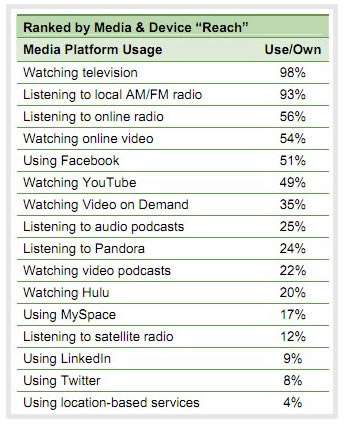
Today I was reading through a new report put out by Edison Research and Arbitron, The Infinite Dial 2011: Navigating Digital Platforms, and noticed some interesting things.

Right now, Facebook has reached majority, meaning that more than half of the US population now uses Facebook on a regular basis. In less than 3 years, it has grown from an 8 percent to a 51 percent usage. So if you are trying to reach the average consumer here in America, its pretty safe to say that you can do so through Facebook.

One in five Americans report that they have visited social networking sites several times per day. And one in four users state that they are following brands or companies in addition to their online friends.

It’s hard to ignore those facts. And it’s hard to run a company, and not know Facebook is the place to be to reach out to target marketplaces.

But what about Twitter?

This same report states that while 92 percent of Americans have heard of Twitter, only 8 percent say they have ever used it.

One of the biggest reasons I think the gap between those who have heard it and those who have actually used it is so high is because Twitter takes a bit more to understand.

When I mention Twitter to a room full of people, I will undoubtedly get the question “Why do people care what I eat for lunch?” The common misnomer about Twitter is you report what you are doing. Twitter is more than that; it’s about communicating, building relationships, and building your expertise.

But if your client base doesn’t get it, no matter how much you Tweet, you’ll never reach them.

1. Start by finding out where your clients are.

2. Look towards the future. If statistics show on social platform growing, put your time into that platform.

3. Watch your results. If you see action, keep it up.

4. Try new things. Just because statistics show something is falling off doesn’t mean its not right for you. If you have the time, try it. Then monitor your results, and continue doing what works for you.

Common Sense Safety Tips For Social Sites With GeoLocation

Location based platforms are everywhere. With the rise in use in Foursquare, Facebook and Twitter, location based marketing offers promising alternatives for brick and mortar businesses.

For those of you that use it, you love it. But if you are still new to the concept, you may be asking yourself “why would anyone want to use this technology?” It opens up a variety of new problems to your already complicated life. GeoLocation sites have their purpose. And as many case studies have show, businesses can do quite well with this technology. But if you decide to use it, you should focus on security first.

1. Never use geolocation features at home. Logging in from home not only tells people when you are at home, it also tells people where your home is. With the huge impact of social over the past few years, if a person wants your home address, nothing can stand in the way of them finding it. But do you really want to broadcast it out to everyone?

[Read more...]

How To Use SocialMention To Find Content For Your Social Sites and Blogs

TheSocialGhost.com shares tips and strategies for using SocialMention to find content for your social media sites and blogs.

You Know You Are A Twitter Addict When …

You know you are a Twitter Addict when:Twitter Addict

  • You are out networking face to face, you ask people what they are @ instead of what they do.
  • You’re in a seminar on social media, and you announce you have more Twitter followers than the speaker.
  • You can’t make it through a dinner conversation without talking about your Twitter friends.
  • You lie in bed at night thinking up clever ways to get retweeted.
  • Your kids introduce you to their friends by saying “she tweets”.
  • You run to the television every time Twitter is in a commercial.
  • The highlight of your day is Tweetup invitations.
  • Tweetdeck is the first application to load on your desktop.
  • You use the Twitter bird on your birthday cake.
  • You buy a house on Twitter Road.
  • You upgrade your phone to Tweet better.
  • Twitter t-shirts are the only gift you’ll be giving this holiday season.
  • You Tweet the details of your vacation.
  • You spend 30 minutes brainstorming ways you are a Twitter addict. (Yes, I must confess…)

Okay, I’m sure you can add to this list. Let’s hear it. You know you’re a Twitter addict when…

Drew Carey Bid $1 Million For Twitter @drew

Drew Carey pledges $1 million to Twitter user @drew if he can bring in 1 million follower by December 31, 2009

Twitter Tools – Research Tools

Research Tools help to quickly obtain information in Twitter. We have put together a list that will help you organize the Twitter experience.

AskOnTwitter

AskOnTwitter.com is a simple application that collects all tweets with the phrase ‘Does Anyone Know’ in it and displays them on these pages, for everyone to see – and to answer!

BackTweets

Search for links on Twitter – track and monitor links that spread on twitter. Check out advanced mode to search specific date ranges and users.

Cherpa

Follow keywords on Twitter and keep up to date on trends

GigaTweet

See how many tweets have been posted on twitter.com
[Read more...]

Twitter Tools- Community Tools

Community connections in Twitter allow you to interact with similar groups or users in your area. We have put together a list that will help you organize the Twitter experience.

Dwellicious

Organize your properties with tags on your own personal Dwellicious bookmark page

Favrd

Top Twitter posts that are “non-commercial” or sales posts found within the Twitter community.FeedTwitter

Feed Twitter

Feeds your RSS Items to Twitter with some Spice

Feedtweeter is a little service that allows you to link Twitter to your other activities. Basically it’s a system that keeps track of an RSS feed and processes any new items that appear.

Gridjit

Gridjit is a social portal that lets you view your web universe in a whole new way. The original Gridjit only supported Twitter but the new version has been redesigned to allow us to add more services. The next version will support Twitter and FriendFeed.

Group Tweet

Group message broadcasting for Twitter Problem: Malcolm, Zoe, Kaylee, Simon, and River all work together on the same web development team. They are avid Twitter users and want a similar way to broadcast quick messages and updates to everyone on their team. Since these messages may contain confidential information, the team doesn’t want them published to their public Twitter timelines or to any followers who are not part of the team. Solution: GroupTweet allows Malcolm and the gang to send messages via Twitter that are instantly broadcasted privately to only the team members.

Just Tweet It [Read more...]

Twitter Links – Twitter Tools Part 2

We have put together a list of Twitter connections.  Sites that help with your social experience on Twitter. Our resouce list has become too big so we split it up into multiple pieces.

Tools Part 2

Twemes

Twemes.com follows public Twitter.com tweets (messages) that have embedded tags that start with a # character. These are sometimes called hashtags but we like to use the term twemes. Through the use of twemes, we can all view what people are talking about across the whole Twitter universe. In some sense, this can be thought of as an adhoc chatroom. We also pull in recent public photos from Flickr and public bookmarks from Del.icio.us. Twemes.com is particularly useful for keeping up on the real-time activities associated with a live event such as a conference. People who attend an event can choose an obvious tag (i.e., sxsw for South by Southwest) and use this tag as #sxsw in tweets, sxsw in uploaded Flickr photos and Del.icio.us links. Twemes.com also allows for adhoc polls to be created associated to a tweme.

twickie

It’s the Easiest Way to Archive a Twitter Response Thread

Twist

View trends on Twitter in a graphical format.

Twitdom

Twitdom is a database maintained by fellow tweeple like you.

Twitly

Seperate the groups you follow on Twitter [Read more...]

Twitter Links – Tools For Twitter

We have put together a list of Twitter connections.  Sites that help with your social experience on Twitter.

Tools

coTweet

CoTweet lets multiple people at the same company manage their business Twitter accounts together while keeping tabs on their brand name and how it’s being used. CoTweet can also be used to assign tasks to different departments and follow up on results and feedback.

DoesFollow

For all of the users that are obsessed over who’s following who: doesfollow will tell you exactly that. Just put in the two users and it plops out if they follow each other or not.

Feedalizr

Keep up to date with you and your friends social media activities on your desktop.

Friend or Follow

Submit your Twitter screen name to find out who you’re following that’s not following you back, and who’s following you that you’re not following back.

HootSuite

Streamlined Twitter account management from one clean, user-friendly interface is yours when you use HootSuite. In addition to being able to manage multiple Twitter accounts and profile from one application, you can also schedule tweets, track clicks to your links (using HootSuite’s ow.ly URL shortening service) and get an entire overview of each Twitter account with easy tab-based navigation. [Read more...]

How To Use Twitter Search To Grow Your Business

TheSocialGhost.com provides you a quick look at using the search functions within Twitter to grow your business potential.